
Day 4: Smarter Job Search
LOOKING FOR LEADS IS AN ART
Today’s goal is…
To learn where, how, and what to look for in Production roles.
Gear Check:
• Job Application Tracker + Template
• Helpful Hotkeys

4.1: Optimize Your Job Search
Scrolling and clicking through job posts may sound simple, but over time can lead to overwhelm & exhaustion. So, it needs to be sustainable.
A few tips to keep you going…
-
Instead of a “daily to do list,” commit to weekly goals instead.
Missing daily tasks can lead to guilt, which can be paralyzing to some. Weekly goals allow for flexibility especially when you’re not 100% on some days, or when life things happen.
—Talk to people —connect with other job seekers.
Job search is so often done in isolation and that can breed negative emotions when you feel like you’re on your own without any support. Small chats go a long way. Sometimes it’s insight, sometimes it’s cathartic, and sometimes, it’s just nice to feel seen and know that someone else is going through the same journey as you.
—
If connecting with others sound good to you, join us in chat here!
—Remember orientation? Every rejection is a redirection.
Sit in the sting for a moment, but come back and reset. Today may not be the day, but you’re still on your way.
—Use the Pomodoro Technique: Focus on 1 task for 25 mins, take a 5 min break, then do another 25 mins. Repeat twice.
example:
25 mins: Open a tab for each studio career pages and job boards
5 mins: break - no screens!
25 mins: Open a tab for each Production job posting
5 mins: no screens
25 mins: Close tabs of roles you’re not interested in
5 mins: no screens
25 mins: Arrange tabs from most likely to apply to least
15-20 mins: long break
—
PROD TIP: Here’s a job board for Production Department roles!
—Treats! And I don’t mean just sweets. Celebrate other wins in your journey and not just when you land the job.
examples of small wins:
- completing 1 set of Pomodoro 🍅
- drafting your resume
- finishing a cover letter
- getting a message from a recruiter that is NOT automated
examples of treats:
- I personally like Reese’s cups…and bread :D
- petting the fur baby 🐾
- for longer breaks, reading a chapter of a book
- a walk or a cup of hot beverage —maybe both!
NOTE: Scrolling on your phone is NOT a treat.
-
Your physical well-being affects your mental health too.
Hydrate.
Check your posture. Opt for ergonomic equipment if you can. Whenever possible, try not to job search on your laptop in bed.
Stretch or go for a walk at least once a day.
Keep your space tidy. Clutter is a stimulant and can add to stress.
Use blue light filters to reduce eye strain.
Physically move away from your desk every hour at the end of every Pomodoro set. If you can keep your eyes screen-free, even better.
-
Batch similar tasks together.
Track which job openings you’ve applied to already. Check out my Note-to-Self in Ch. 4.3 to see how I track my own applications.
Set a realistic goal of how many jobs you’ll apply for in a week. Keeping in mind that you may have to tailor each one to the post.
I do 3-4 per week —but your situation may be different. That’s okay.Quality > Quantity
What’s the point of mass applying if none of them will move forward in the job search process anyway?
Tailoring your application takes time and effort, but increases your chances more than applying with a weak resume would. Your time is better spent on a task with a higher ROI.Prod Tip #277: Rest is guilt free. When taking a break from work, don’t think about work or OTHER work you can do! Rest is productive too.
“Digging up opportunities is not easy, but with the right strategy, you can stay in the game and get closer to what you’re searching for.”
HOW IT PAYS OFF
It saves time and effort.
It reduces burnout, stress, & discouragement.
It becomes less daunting. Small steps make it easy to start.
It’s less work.
In being more intentional and targeted, you cut down on extra applications that would not have been a fit anyway.It builds confidence —you feel like you’re on the right track.
It increases your chances of getting an interview.
The less time you spend aimlessly browsing pages, the more time you can put towards tailoring your applications.It makes rejection less painful. Purpose feeds patience.
It helps you to keep going when it feels that it moves the needle, and progress then builds momentum.
It supports self-awareness, helping you grow overall.

REMINDER:
Notes are based on your Camp Leader’s own experience and are not necessarily the only possible approach.
This course is just a guide and an example, not a bible.
4.2: Production Jobs and Where to Find Them
Here’s where I would usually start…
IN THIS ORDER:
-
Browse job boards first that cover multiple studios at once, before sifting through each studio. Some platforms enable you to filter by location and/or for jobs specifically for the Production Department —making the search much quicker.
Samples:
Jobs - So You Wanna Be Prod
Productions.com - mostly US based
Animation/VFX/Game Industry Job Postings - Google Sheet by Chris Mayne
-
Sometimes, you’ll hear about job openings on social media first before you see them reflected on the studio’s website.
LinkedIn - follow studios you’re interested in
Women in Animation Newsletter
The Prod Recap - So You Wanna Be Prod’s Newsletter
The Prod Chat - our Discord server has a #job-search channel
-
Visit each studio’s own career or job pages.
For a list of studios in your area, filter for location here:
-
Some might argue to reach out to your network earlier than what we have here, and that’s ok too. I prefer doing my own research first.
Once you’re ready, reach out to your personal and professional connections for insider tips of upcoming or current job openings.
We’ll cover this in more detail in the next lesson: Day 5: Networking.
-
Not always as effective as the above, but good for networking.
Spark CG Society
Hosts VFX and Animation festivals and Career Fairs in VancouverACM SIGGRAPH Volunteers
Volunteering for one of the world’s largest conference in CG.

PROD TIP: Use the Pomodoro Technique in between batches to help curb burnout.
Note: So You Wanna Be Prod is not affiliated with the external links provided.
They are shared solely for informational purposes and may be useful to others.

4.3: How to Job Search More Efficiently
Here’s the plan.
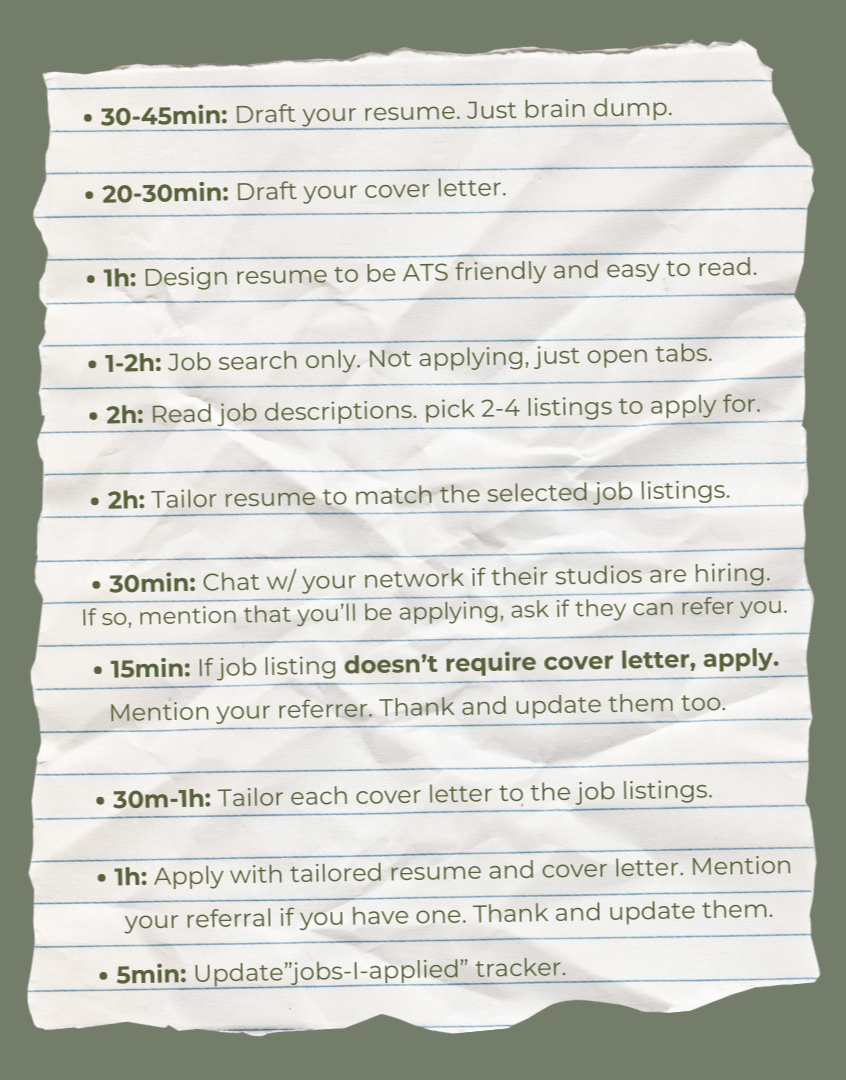
GOAL FOR THE WEEK: Submit 2-4 job applications

-
I like to email myself after applying for a position to help keep track of what and when I applied. Here’s what I write.
Subject: APPLIED: <STUDIO> <ROLE>
Body:
screenshot of “sent” receipt
version of resume/cover letter sent
salary range entered online
referral contact/name
any other field that was unique about this application
And then I save it in a folder named after that studio where all future correspondence will also be saved.
-
Keyboard shortcuts on Windows to help speed up your process.
On Browser
Ctrl + T : Open a new tab
Ctrl + left click : Opens link in new tab
Ctrl + W : Closes current tab
Ctrl + Shift + T : Reopens last tab(s) closed
Ctrl + Tab : Switch view to next tab on the right
Ctrl + Shift + Tab : Switch view to next tab on the left
Ctrl + F : Find specific word(s)
Ctrl + L : Highlight current tab’s URL link
Tab : Jump to next field to fill out in an online form
On File Management
F2 : Rename a file
Ctrl + C : Copy
Ctrl + V : Paste
Ctrl + Shift + V : Paste as text only. No format.
Ctrl + X : Cut
Ctrl + Z : Undo
Ctrl + Y : Redo
Ctrl + A : Select all
Ctrl + S : Save
Alt + Tab : Switch between open apps
Windows Key + . : emoji pop up box—
PROD TIP: This list is printer friendly! Grab a copy from your gear pack when you access the course materials. Get the link here. -
Keyboard shortcuts on Mac to help speed up your process.
On Browser
⌘ + T : Open a new tab
⌘ + left click : Opens link in new tab
⌘ + W : Closes current tab
⌘ + Shift + T : Reopens last tab(s) closed
Control + Tab : Switch view to next tab on the right
Control + Shift + Tab : Switch view to next tab on the left
⌘ + F : Find specific word(s)
⌘ + L : Highlight current tab’s URL link
Tab : Jump to next field to fill out in an online form
On File Management
⌘ + C : Copy
⌘ + V : Paste
⌘ + X : Cut
⌘ + Z : Undo
⌘ + Shift + Z : Redo
⌘ + A : Select all
⌘ + S : Save
⌘ + Tab : Switch between open apps
Control + ⌘ + space : emoji pop up box—
PROD TIP: This list is printer friendly! Grab a copy from your gear pack when you access the course materials. Get the link here. -
Check your Gear Pack for a copy of a job application tracker to log jobs you applied for.
If you don’t have it yet, sign in here.
DID YOU KNOW?
Having ”Production” in the job title does NOT always mean a role in the Production Department. “Production” has multiple meanings, so it’s important to always read the job description to check.
-
These are the job titles that you’d normally find in a Production Department
some internships (read their job description to assess)
Production Assistant / Runner
Production Coordinator / VFX Coordinator / Show Coordinator
Production Supervisor / Associate Production Manager
Production Manager / Associate Producer
Producer / Digital Producer
Line Producer / Supervising Producer
Head of Production
—
PROD TIP: “Virtual” in the title does not mean Work From Home. It’s most likely pertaining to a type of production. See virtual production. -
Just because “production” is part of their job title, doesn’t mean that they’re the Production roles you’re looking for. Read the post. Knowing the difference saves time because now you know to skip them.
some Production Assistant roles - responsibilities vary
Executive Assistant
VFX Production Finance
Production Administrator
Project Manager
Product Manager
—
If you’re ever unsure if a job you found is a Production role, feel free to ask us in the #job-search channel. Join The Prod Chat here. -
Thinking of switching career paths? Or looking for something similar to Prod, but not quite? Here are a few that may interest you.
Facilities or Office Coordinator / Front of House / Receptionist
Executive Assistant
Scheduling Coordinator
IT Coordinator
Training Coordinator
Department Manager
Talent Manager / Artist Manager / Crew Manager
People & Culture Coordinator
HR / Recruiting
PROD TIP: Speculative Applications or Expression of Interest are valid!
You may happen to apply right when a need arises and before an official job listing is posted —or at the very least, it’ll be good interview practice.
PROD TIP: Keep a copy of studio job postings as a handy reference for role descriptions. This makes it easier to update your resume later, even if the studio removes the original listing.
Or, a go-to reference for your roles & responsibilities when you get hired.
4.4: Job Posts & Why You Should Read the Description
Make job posts work for you.
PARTS OF A JOB POST & HOW TO USE THEM
ABOUT THE STUDIO
➤ WHERE: Usually at the top or bottom of the job posting’s page.
➤ HOW: Check if their values and culture align with yours.
ABOUT THE ROLE - TITLE, OVERVIEW, LOCATION, FT/PT, WORK MODEL
➤ WHERE: Usually at the top of the job posting’s page.
➤ HOW: Check if you can see yourself doing this job.
* Work Model = remote / in-studio / hybrid
RESPONSIBILITIES
➤ WHERE: Mid-section, usually in bullet points.
➤ HOW: Check if you agree with the scope of work for this job.
➤ BONUS: A goldmine for keywords, tailor your resume based on it.
QUALIFICATIONS / REQUIREMENTS
➤ WHERE: Underneath the responsibilities.
➤ HOW: Check if you are eligible and if you have enough experience.
➤ BONUS: A goldmine for tailoring your resume’s SKILLS & TOOLS list.
COMPENSATION & PAY RANGES
➤ WHERE: At the bottom of the page.
➤ HOW: Check if you agree that this is fair & financial viable for you.
APPLICATION INSTRUCTIONS & DUE DATE
➤ WHERE: At the bottom of the page.
➤ HOW: Check to follow how to proceed and when the cut off time is.

DID YOU KNOW?
In Canada, employers in BC, PEI, & Ontario are required by law to include pay or pay range in all publicly advertised job postings? If you’re outside these places, you can also check the studio’s Glassdoor page / reviews for more insight.
NEXT STEPS:
Tailor your resume based on the job description.
Update your LinkedIn profile too.
PROD TIP: Alternatively, you can let the job find you! Instead of you having to find it.
Talk to your network, let others know that you’re Open to Work.
-
Relevant tips for production. Click on the number for more info.
—
#277: Rest is guild free.
#280: The word "Production" can mean multiple things, and it's not always referring to the Production Department.
#295: Most studios have a referral program.#305: Always thank people who refer you.
TIP: It’s always worth asking your network because sometimes, jobs like Production Assistant or Production Coordinator do not always get posted in public pending a possible internal hire. If that doesn’t pan out, it’d be great if your resume in mind as backup!
TIP: Ask your connections currently working in a studio that you’re interested in if they know if a job posting on their studio’s website is still active or outdated.TIP: You can learn more about some of the roles by reading about them in The Prod Word Bank.
TIP: Feeling alone during job search is common, but it doesn’t have to be. Find ways to be able to chat with others to avoid the dread and feeling of isolation. You can start by joining fellow campers here!
TIP: When you’re faced with a lot of closed doors, remember that every rejection is a redirection. You’re still on your way.
TIP: Try the Pomodoro Technique to curb burnout.
TIP: Celebrate other small wins in your journey, not just when you land the job.
TIP: Your physical well-being and your surrounding space affect your mental health too.
TIP: Keep a tracker of jobs you’ve applied for.
TIP: Quality job applications are more worth the effort than quantity.
TIP: Search for roles in job board platforms that collates all listings from multiple studios at once to save time.
TIP: Follow studio social accounts for early tips on job openings.
TIP: Job Fairs are not always effective in job search, but a fantastic way to grow your network and connect with recruiters.
TIP: Use hotkeys to speed up your job application process.
TIP: Break up the job search tasks into smaller tasks and focus on 1 thing at a time for a short time period. This makes it easier to start and more sustainable to continue.
TIP: “Virtual” in the title does not mean Work From Home. It’s most likely pertaining to a type of production. See virtual production.
TIP: Speculative Applications or Expression of Interest are valid. You may happen to apply right when a need arises and before an official job listing is posted —or at the very least, it’ll be good interview practice.
TIP: Keep a copy of studio job postings as a handy reference for role descriptions. This makes it easier to update your resume later, even if the studio removes the original listing. Or, a go-to reference for your roles & responsibilities when you get hired.
TIP: Check Glassdoor for typical pay range for a studio and Production roles.
TIP: You can let the job find you. Instead of you having to find it.
Talk to your network, let others know that you’re Open to Work.
#269: People like to help -
Anecdotes from the real life.
—
When it takes so long for the webpage to load because the studio wants to have some fancy animation/transition widget.
When a studio does not utilize their own Job or Career page to post job listings.
When you have to scroll and scroll…and scroll before you get to the actual job list. Worse is, you get there, and there’s a separate button to take you to yet another different page to see the list.
When a studio career page stays dormant and job postings remain on the page for months, and you never know if they ARE still looking or if the position’s since been filled. Do I apply again???
The classic. After writing and uploading your resume and cover letter, the online form then asks you to fill out the same information.
When you need to create an account on their website first before being able to submit your application.
When the application form has mandatory long answer questions —questions that would normally be asked in an interview. Let’s meet.
When it takes too long to find “the right career page.” Why is it hidden???
-
Here are the main takeaways from today’s camp.
Being smarter in your job search not only saves time and effort, but it also takes better care of your mind and body, making the process healthier and more sustainable.
There are other platforms that already exist to help the job search less grueling and a little more intuitive. Seek out job boards and studio social media pages to get early tips on job postings.
Break up the job search process into smaller tasks and do them in smaller time chunks to make it easier to start and less overwhelming.
Track job applications to avoid redoing the same work.
Having “Production” in the job title doesn’t necessarily mean that it’s a role in the Production Department. Knowing the difference will help avoid putting effort on an otherwise incorrect application.
The Job Description of a job listing is an invaluable source of key skills as well as information to determine if a job is a fit for you.
-
SOY is not affiliated with the external links below, but these references are listed here in case they may be helpful to others.
—
Video by Mei Pak, Creative Hive
Videos by Emily Yakashiro, A Course in Production
Entry Level Opportunities by Cinesite
Recommended books - these are affiliate links
Feel Good Productivity, by Ali Abdaal
Essentialism, by Greg McKeown
Atomic Habits, by James Clear
—
GUIDED TRAIL - Got any recommendation for job search sites?
Submit it here.
Or let us know directly in the Discord #land-the-job channel here.
Action Items:
No. 1: Hydrate
No. 2: Tailor your resume based on a job listing of your choice.
No. 3: Give yourself a treat for a now much stronger resume!